
English

Connected delivery. Continuous context.

Complex projects.Clear control.

Bring your documents, workflows and asset activity into a shared context. Give delivery and operations teams a clearer view of the work, the evidence and the next decision.

BSI Kitemark certified for ISO 19650. One platform. Activate the UP and Flex modules your scope needs.

Conceptual architectural cutaway with a thread connecting building levels and plant equipment
Concept illustration, not a customer project or a product screenshot

From the first record to the next stage.
One connected information journey across field work, document control, handover and operations.

  • Documents
  • Workflows
  • Assets
  • Evidence
  • Handover
  • Operations

One platform. Modules you switch on as you need.

Videntium UP covers asset activity and Videntium Flex covers information flows. Start with the modules your first scope needs and activate more as the work grows.

Videntium UP

Asset activity, from inspection to operation.

Give asset activity a clear structure, from quality inspections and commissioning to handover and ongoing work.

  • Assets, systems and locations
  • Quality checklists and findings
  • Test and commissioning progress
  • Handover dossier tracking
  • Work orders and planning
  • Field map and teams
Explore UP

Videntium Flex

Information with a defined route.

Give information a clear route, from a document revision or meeting action to review, approval and the project record.

  • Document register and revisions
  • Reviews, approvals and decisions
  • Meetings and action items
  • Requests for information
  • Signature requests
  • Letters, tickets and tasks
Explore Flex

See it in the product.

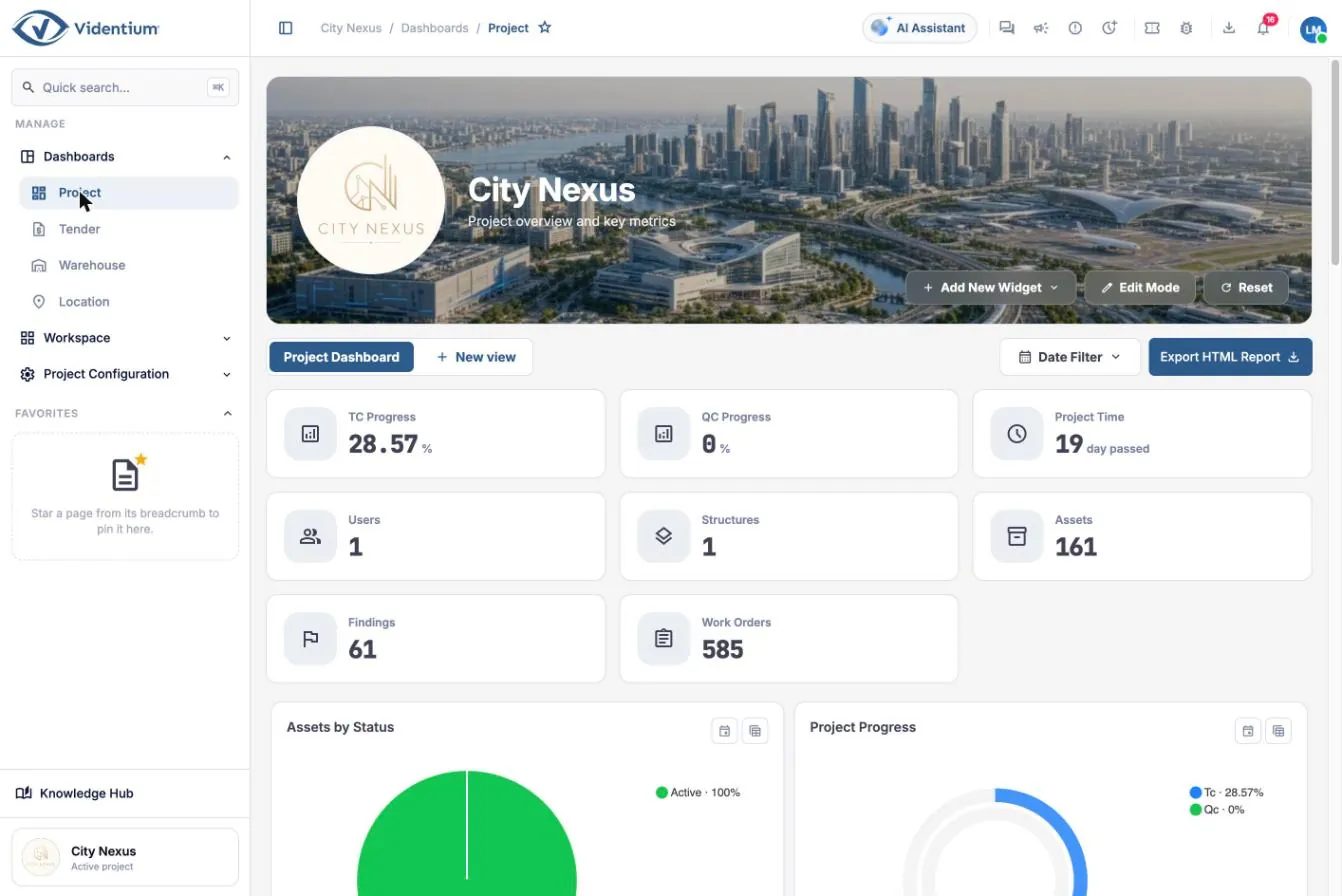
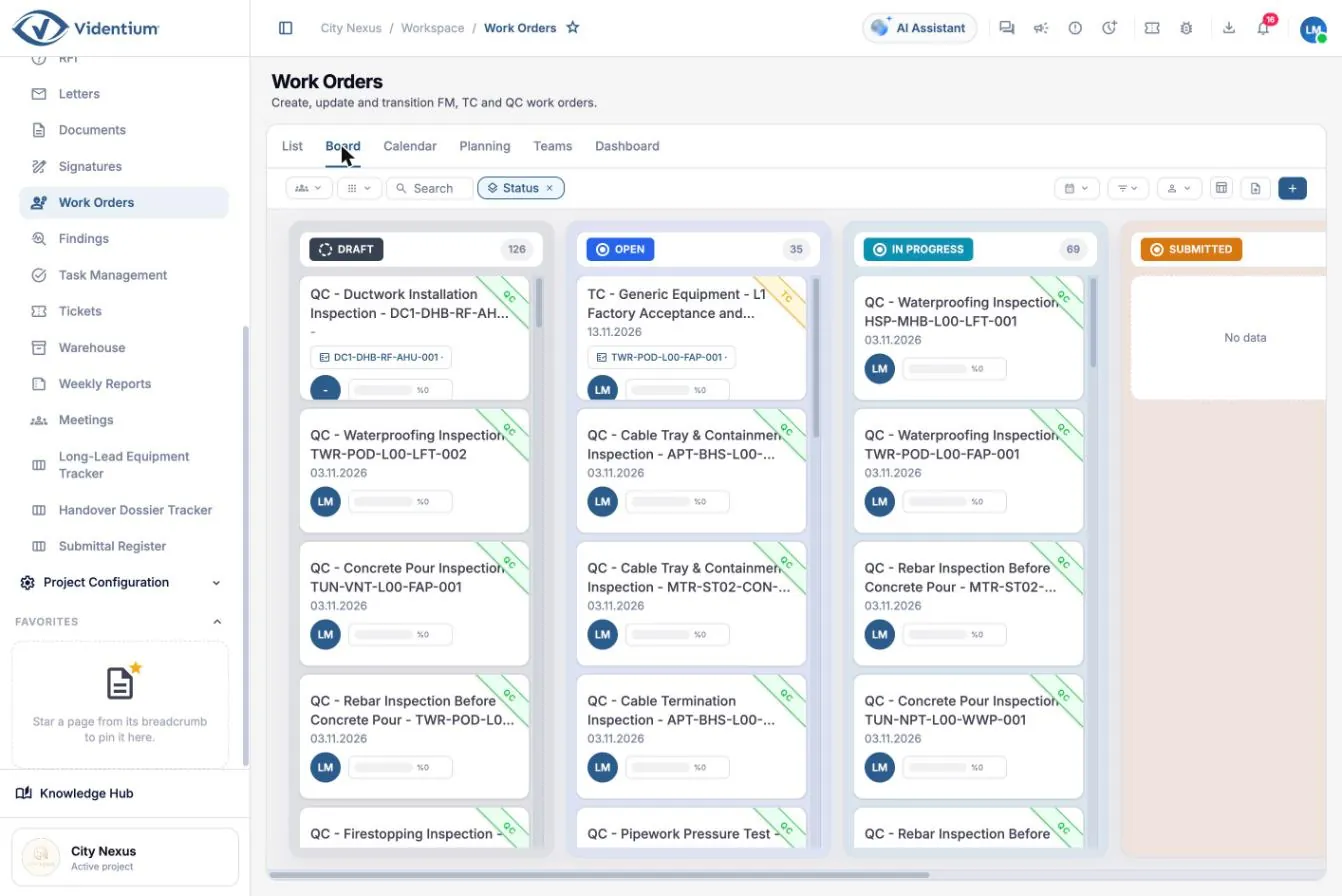
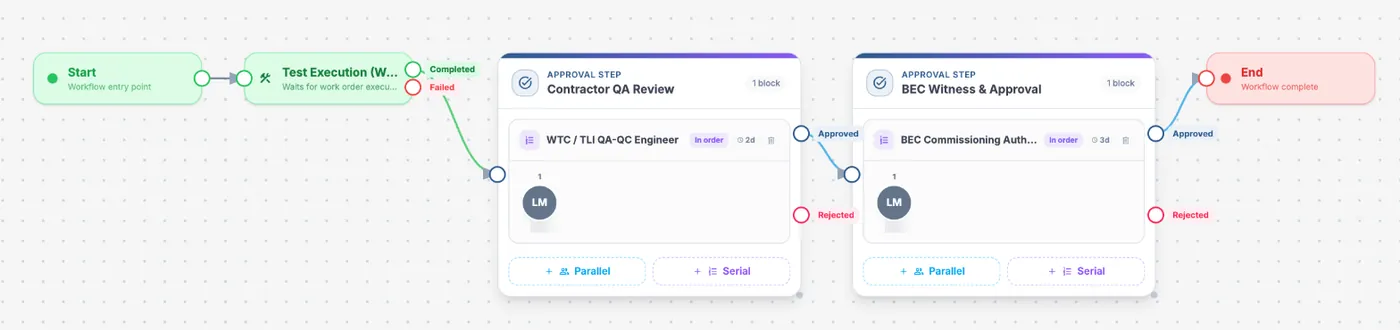
Real screens from the City Nexus demonstration project: one dashboard, the daily work and the approval route behind it.

Project dashboard with testing and quality progress, assets, findings and work order figures
Project dashboard: progress, assets, findings and work orders on one page. Open full size (opens in a new tab)
Work order board grouped by status
Work orders by status, across testing, quality and maintenance. Open full size (opens in a new tab)
Workflow designer showing a test execution step followed by contractor and authority approval
The approval route, designed visually. Open full size (opens in a new tab)

Screens show demonstration data.Explore every capability

Follow the evidence. Keep the context.

A decision becomes more useful when the next team can see what led to it.

Asset AHU-L03-02 · Roof plant areaIllustrative data

Field evidence, in context.

Link inspection evidence and findings to the relevant asset, system and location.

Air handling unit

Inspections recorded

24

Records linked

18

Items for review

6
Example records linked to the asset. The status column changes with the selected stage.
RecordTypeOwnerStatus
Pre-functional checklist L3ChecklistCommissioningCaptured
Finding 0142 · Damper actuatorFindingMechanicalCaptured
O&M manual rev BDocumentDocument controlFor review
Example values change with the selected stage.Illustrative data

Capture. Capture the detail once. Keep the asset, location and evidence together for the next person.

  1. CaptureConnect a field observation to the relevant asset and location.
  2. ReviewBring the supporting records into the right review process.
  3. HandoverOrganize the accepted information for the next stage.
  4. OperateKeep the asset history useful as new work is recorded.
Conceptual workspace with synthetic values. Approved product captures replace it when available.How UP and Flex connect

A shared picture. A useful view for every role.

Choose the question that matters to you.

Editorial illustration of commissioning engineers inspecting plant equipment with a tablet
Concept illustration, not a customer project or a product screenshot

From the site to the accepted record.

An observation recorded against an asset becomes a finding, a review and, when accepted, part of the asset history. Each step keeps the one before it in view.

  1. ObserveRecord the inspection against the asset and location, with photos and checklist results.
  2. ReviewThe responsible team sees the evidence, resolves the finding and records the outcome.
  3. AcceptThe accepted record stays linked to the asset for handover and operations.
Quality and commissioning

Make knowledge easier to work with.

Explore how assistance can help teams find, understand and prepare information inside their working context. People retain authority over formal decisions.

  • Find context

    Explore relevant information without losing the project around it.

  • Prepare the next step

    Use assistance to prepare material for an authorized person to review.

How assistance works in Videntium
Illustrative interface
Which records should I read before the AHU-L03-02 pre-functional test?
Three records relate to this asset.

Installation verification checklist L2 (completed), finding 0142 on the damper actuator (resolved), and O&M manual rev B (in review). The commissioning coordination meeting on 2 Nov links all three.

Checklist L2Finding 0142O&M manual rev BMeeting #43
A prepared summary. Approvals and closures stay with the authorised person.

Build confidence into the way work moves.

BSI KitemarkVidentium is certified under the BSI Kitemark for BIM software, supporting compliance with the ISO 19650 framework (BS EN ISO 19650-1, -2, -3, -5 and PAS 1192-6). Certificate KM 814374, valid to 17 March 2028.

Permissions

Define who can access information and take action.

Traceability

Keep the record of important activity available for review.

Deployment discussion

Shape the deployment conversation around your requirements.

Clear responsibilities, visible history and controlled decisions belong in the everyday workflow.Trust and governance

Begin with a real process. Build from there.

Start with a focused problem and give teams a practical route to adoption.

  1. Understand

    Map the work, the information and the people involved.

  2. Configure

    Agree the structures and workflows the first scope needs.

  3. Extend

    Use what the team learns to plan the next stage.

Bring your process. Let’s make the next step clear.

Start with the work you need to improve, whether that is a project, a workflow or an asset portfolio.

Plan your walkthrough